
Get YouTube Text
Read, customize, and export YouTube transcripts without creating an account.
Turn YouTube videos into transcripts, chapter summaries, and answers linked to timestamps.
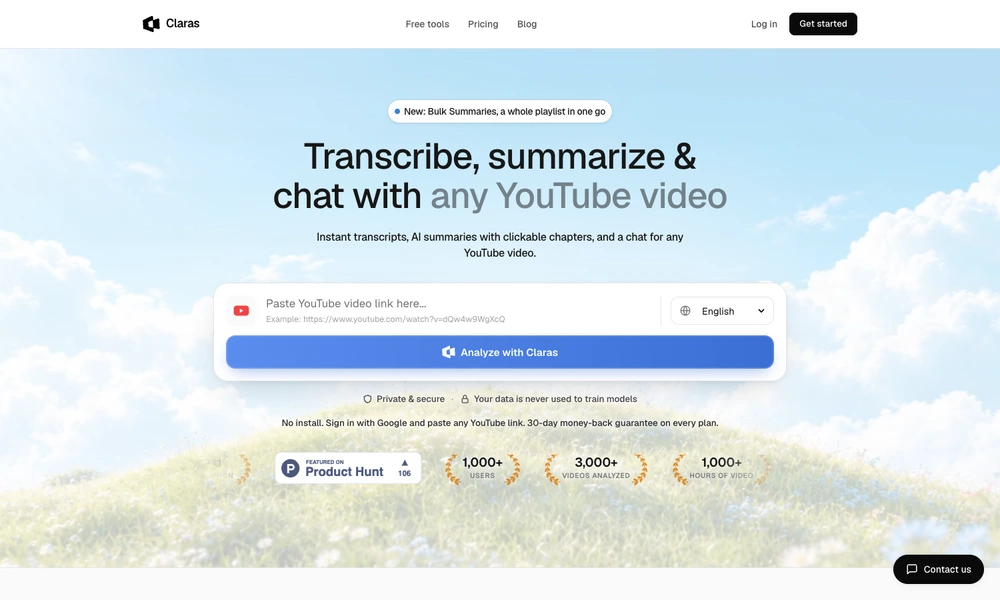
Claras helps viewers work through YouTube videos using transcripts and AI summaries. Users paste a video link into the web app or open a video with its browser extension. The result includes key points, chapters, and clickable timestamps for returning to the relevant moment.
A chat interface answers questions using the full transcript and links responses to their source segment. Bulk Summaries processes playlists or search results together, supporting comparisons across several videos. Users can choose a summary language, search the material, and export transcripts as text, PDF, or subtitle files. The workflow suits research, study, and collecting useful information from a growing watch list.
Tried it? Share a useful thought or ask a question.
Good conversations start with a hello.
Sign in to commentRead, customize, and export YouTube transcripts without creating an account.
Generate translated YouTube captions and ask questions about individual segments.
Create editable transcripts and subtitles from audio or video
Transcribe, edit, translate, and export audio or video from files and supported links.
Transcribe, summarize, and clean up audio with native Mac apps
Turn podcast and video episodes into transcripts, summaries, and searchable text