
VolumeHub
Control each Mac app’s audio from the menu bar
Control Bose QC Ultra modes and audio sources from Mac
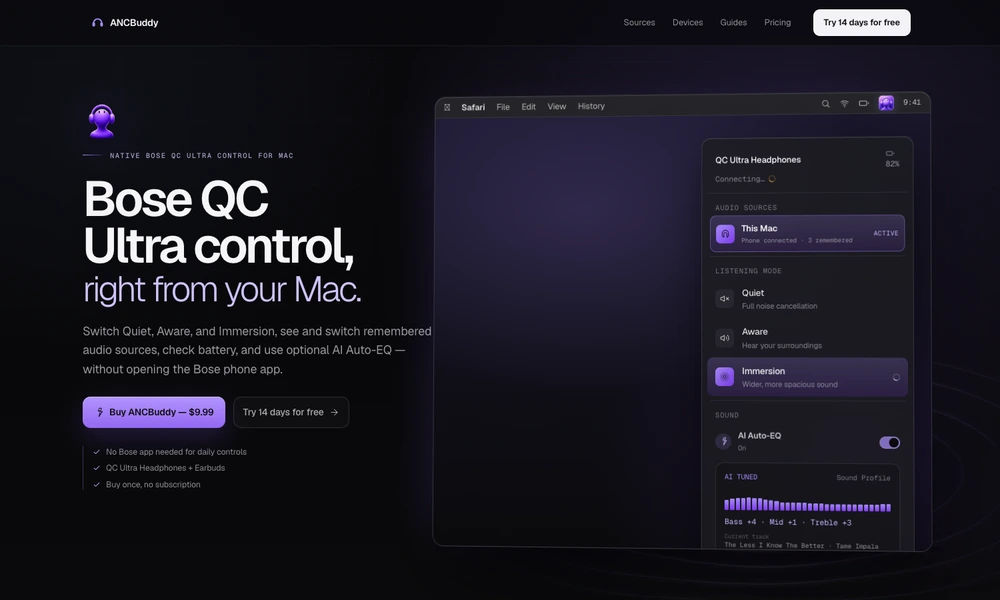
ANCBuddy puts everyday Bose QC Ultra controls in the Mac menu bar. Switch between supported listening modes, check the battery, and see which remembered device is supplying audio without reaching for the phone application. The panel can also switch to a remembered source or begin pairing.
The utility focuses on compatible QC Ultra headphones and earbuds rather than general Bluetooth device management. An optional AI equalizer can adjust a visible bass, midrange, and treble profile for the current track; ordinary mode and source controls remain local. A trial lets users check the workflow with their hardware before purchasing a license for the Mac application.
Tried it? Share a useful thought or ask a question.
Good conversations start with a hello.
Sign in to commentControl each Mac app’s audio from the menu bar
Review running Mac apps and quit selected groups from the menu bar.
Pause Mac keyboard input when cat-like key patterns appear
Monitor Mac resource usage, temperatures, network activity, and battery health from the menu bar.
Track network data usage and receive limit alerts from the Mac menu bar.
Understand thermal pressure and heavy workloads on a fanless MacBook Air.