
SideNotes
Keep quick notes and tasks at the edge of your Mac screen
Keep structured notes, tasks, and reminders in a panel at the edge of your Mac.
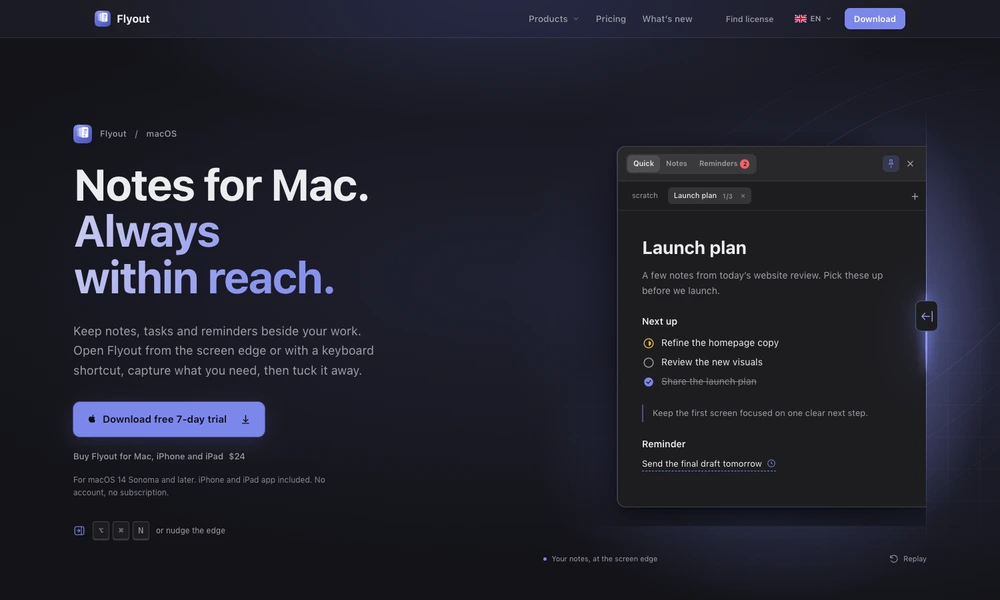
Flyout keeps notes, tasks, and reminders in a panel that opens from the screen edge or a global shortcut. Its editor supports headings, task lists, code blocks, images, tables, and attachments, with slash commands for adding structure quickly. Notes can be organized into folders, tagged across projects, pinned, and searched without leaving the current workflow.
Reminders can attach to a whole note or a selected sentence. Optional iCloud sync carries content to other supported Apple devices, and password-protected notes add encryption for sensitive material. Users can export Markdown, PDF, or plain text and enable a scoped local connection for compatible AI assistants.
Tried it? Share a useful thought or ask a question.
Good conversations start with a hello.
Sign in to commentKeep quick notes and tasks at the edge of your Mac screen
Capture and organize local notes in a compact Mac notch panel
Keep work notes on your Mac and let connected AI assistants read and update them.
Capture short notes from the Mac menu bar and find them without leaving your workflow.
Link daily notes while keeping them as local Markdown files.
Keep connected Markdown notes with an AI editing companion