
Snapr
Capture screenshots and recordings, add annotations, and edit presentation effects in one desktop app.
Capture Windows screenshots and videos, then annotate clear instructions.
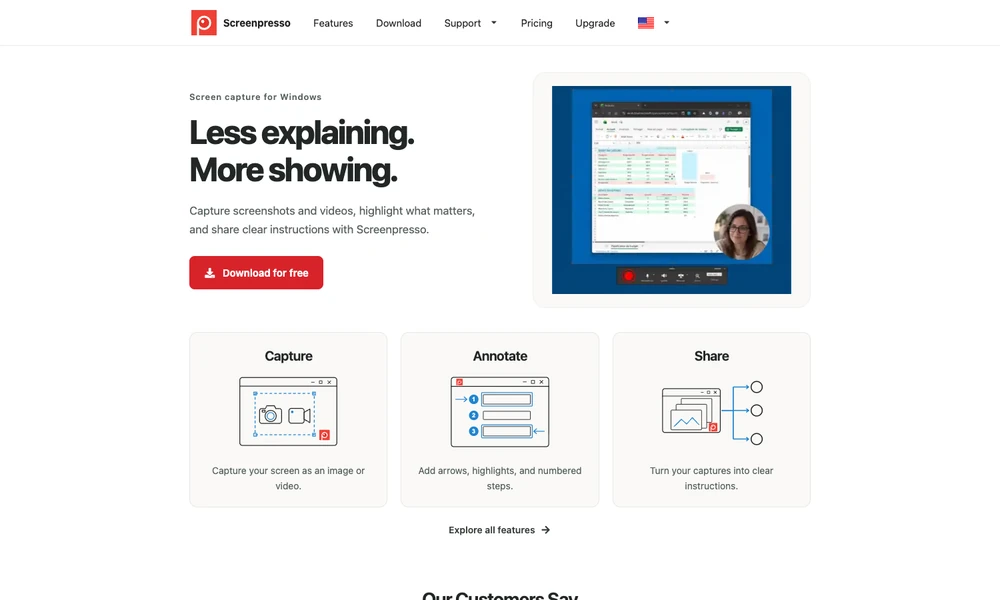
Screenpresso captures Windows screens as images or videos and provides tools to turn those captures into instructions. Users can add arrows, highlights, and numbered steps to show which button to press or where a problem occurs. A still image can document one action, while a recording can explain a longer sequence.
The capture, annotation, and sharing workflow suits software walkthroughs, bug reports, teaching material, and internal procedures. For example, someone reporting an interface issue can mark the affected area before sharing it with a colleague. Different editions provide different feature sets, so the available tools depend on the selected license.
Tried it? Share a useful thought or ask a question.
Good conversations start with a hello.
Sign in to commentCapture screenshots and recordings, add annotations, and edit presentation effects in one desktop app.
Record and annotate screenshots locally in a Chromium browser
Record Windows demos with automatic zooms, smooth cursors, and local export
Capture, annotate, record, and extract text from the Mac screen in one application.
Record, edit, and prepare media locally on a Mac.
Capture short screen recordings and screenshots from the Mac notch.