Greenshot
Capture and annotate Windows screenshots for reports and documentation
Capture screenshots and annotate them with a configurable desktop tool
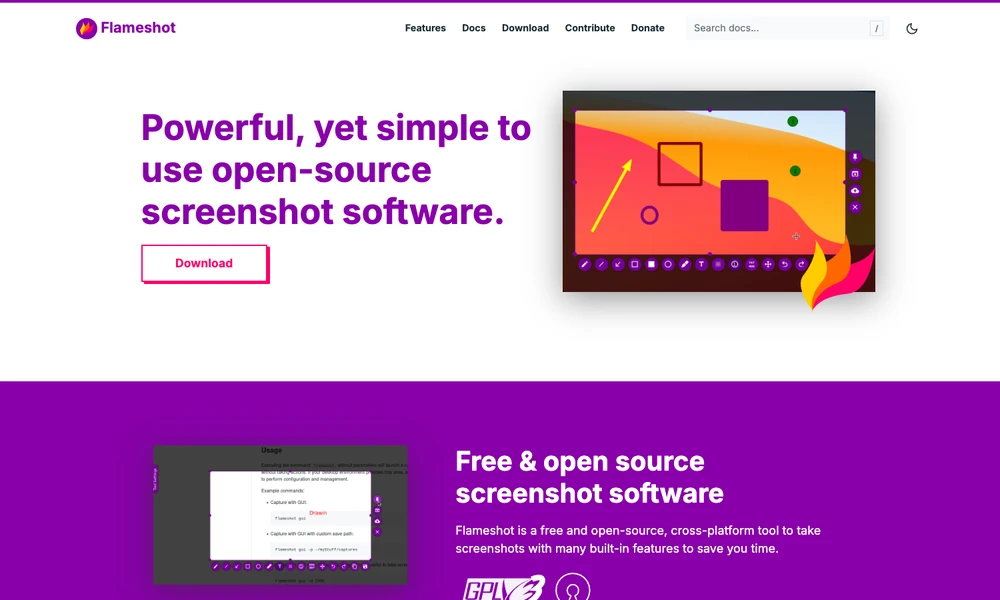
Flameshot captures selected screen areas and provides annotation tools during the capture process. Users can add arrows, text, shapes, highlights, numbered steps, or solid boxes before saving an image. Blur and pixelation offer ways to obscure selected details when preparing a screenshot to share.
The open-source application runs on Windows, macOS, and Linux. Configuration options cover interface colors, available buttons, keyboard shortcuts, and how images are saved. Command-line controls support scripted capture workflows and key bindings. Someone documenting an interface problem can select the relevant area, mark the control or message involved, and save an illustrated report from the same workflow.
Tried it? Share a useful thought or ask a question.
Good conversations start with a hello.
Sign in to commentCapture and annotate Windows screenshots for reports and documentation
Turn screenshots and annotations into structured context for coding agents
Frame, annotate and redact screenshots on a Mac
Capture, annotate, and style screenshots locally on your Mac.
Keep annotated screenshot references above your Mac windows
Capture and annotate Windows screens with built-in design utilities